Home Security Without Monthly Fees: What Actually Protects Your Home in 2026
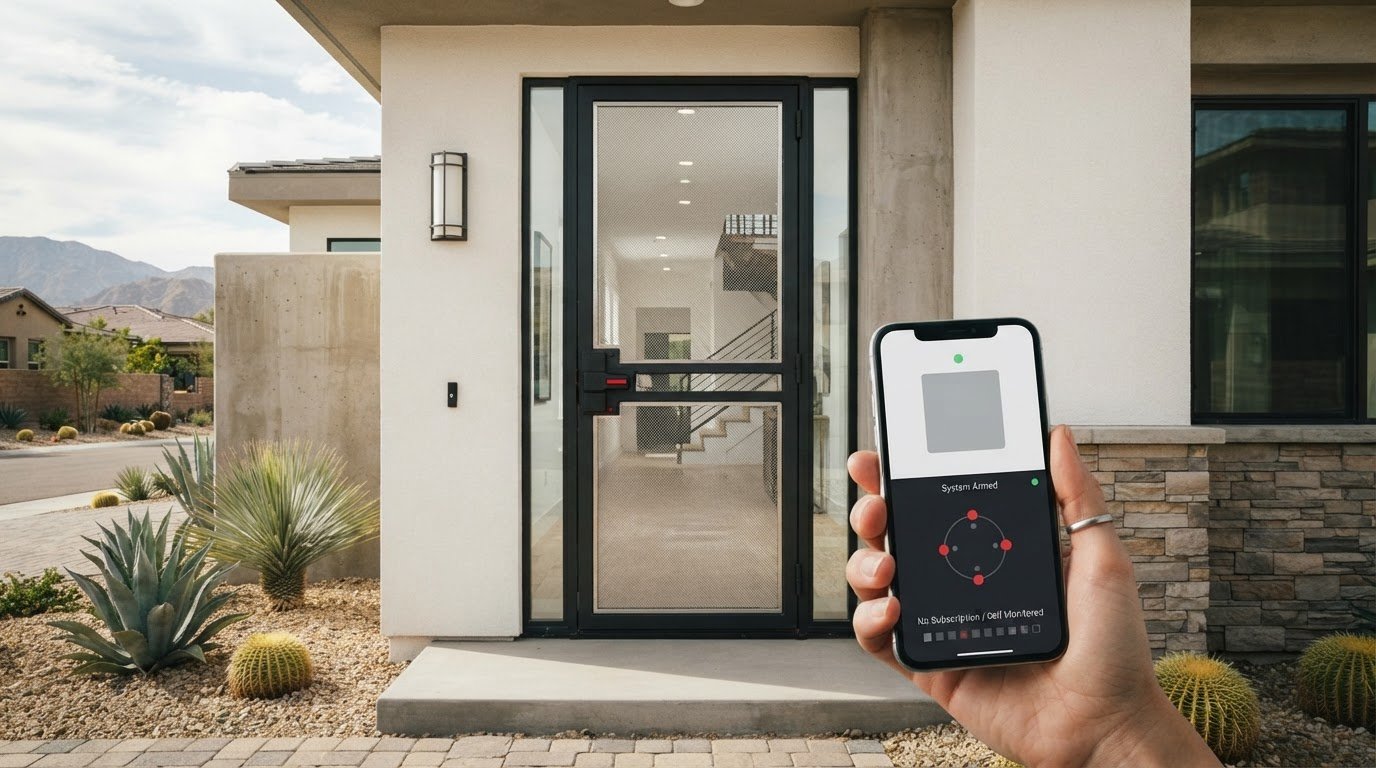
Can home security without monthly fees still protect your home? Yes, but avoiding a subscription doesn’t close every security gap. Self-monitoring can alert you to activity, while a physical security layer reinforces vulnerable doors and windows before an intrusion.
It makes sense to ask what a no-fee setup actually includes, and whether phone alerts alone are enough for your household. The key is to separate monitoring from protection: one helps you respond to alerts, while the other strengthens the openings an intruder might try to use. This guide explains what self-monitored systems can and can’t do, how to plan a practical setup around your home, and where professionally installed security screens add a durable layer while preserving natural light, airflow, and visibility.
Boss Security Screens custom-builds stainless-steel mesh screens for doors and windows, measured to fit each opening and equipped with a 4-point locking system. The company reports 17,000+ installations with zero successful break-ins and provides a 15-year No Worry Warranty covering parts and labor. Boss Security Screens is Licensed, Bonded & Insured, holds an A+ BBB Rating, and is 110% Made in USA. It serves homeowners in Las Vegas, Phoenix, Los Angeles, Riverside, Scottsdale, San Jose, Oakland, San Francisco, Irvine, San Diego, Orlando, Detroit, Chicago, Minneapolis, Albuquerque, Dallas, Houston, and Sacramento. The goal is straightforward: build a sensible plan that gives your household more confidence without confusing alerts with physical protection.
Key Takeaways
- Home security without monthly fees describes a billing arrangement, not complete protection. Know what each device does and what it leaves to you.
- Self-monitoring, professional monitoring, and physical security screens serve different roles. Compare them by how they work, how much household involvement they require, and their limitations.
- Build a practical plan by mapping the doors and windows you use, choosing complementary security layers, and deciding who responds to alerts.
- Custom-built security screens add a physical layer to vulnerable openings while preserving everyday visibility, airflow, and use.
- Boss Security Screens is Licensed, Bonded & Insured, holds an A+ BBB Rating, and is 110% Made in USA.
What Does Home Security Without Monthly Fees Actually Mean?
Want a more secure home without committing to recurring professional monitoring? Start by understanding what “no monthly fee” describes: a billing arrangement, not a promise that a home is fully protected. A system may include equipment such as sensors or cameras, but equipment alone doesn’t decide what happens after an alert. The household’s setup and response plan matter, too.
Think of security as several distinct functions. Equipment detects or records activity. Self-monitoring puts the responsibility for responding to notifications on residents. Professional monitoring involves a service that receives system signals and follows its response process. Physical barriers reinforce entry points. These functions can work alongside each other, but they aren’t interchangeable. A broad overview of home security systems can help clarify how devices and other protective measures fit together.
A no-fee arrangement may mean using equipment without a recurring professional monitoring plan. It doesn’t automatically mean every feature is free, or that someone will act on alerts for you. Before choosing a setup, separate what the equipment can detect from who will receive an alert, who can respond, and whether the doors and windows have a physical layer.
What does self-monitoring involve?
Self-monitoring means residents receive and respond to system notifications themselves, when those notifications are available. In practice, this makes the household part of the response chain. Someone needs to notice an alert, understand what it may indicate, and decide what to do next. If everyone is asleep, busy, away from a phone, or unavailable, an alert may not lead to immediate action. Self-monitoring gives residents direct involvement, but it doesn’t replace other security layers.
How is physical security different from monitoring?
Monitoring concerns detection and response. A sensor or camera may indicate activity, while a monitoring service or resident handles the next step. Physical security addresses the opening itself by adding a barrier at a door or window. Custom-built stainless-steel mesh security screens are measured for the specific opening and professionally installed. They reinforce that opening while preserving natural light, airflow, visibility, and normal operation. Explore security doors as one option for adding this physical layer.
A security screen doesn’t dispatch help or send alarm alerts. It complements, rather than replaces, alarms, cameras, or response services. Keep the distinction in mind when planning: detection can help identify an event, while a physical barrier strengthens a point of entry. A balanced plan considers both, without treating any one device or measure as complete protection on its own.
How Do No-Monthly-Fee Security Options Protect a Home?
A practical plan combines several layers instead of asking one device to do everything. Stronger entry points can make doors and windows more resistant to intrusion. Detection devices can alert residents to activity, while lighting can improve visibility around approaches and entrances. A household response plan clarifies who acts when an alert arrives. Each layer has a role, but none guarantees that every incident will be prevented.
For example, a sensor may detect an opened door, but it doesn’t physically reinforce that door. Lighting can make an entry easier to see, but it doesn’t notify anyone by itself. An alert only helps if someone receives and responds to it. Consider how these layers work together, especially at the doors and windows your household relies on every day.
What can alarms and cameras do without a subscription?
With self-monitoring, residents take the lead when their system sends notifications. What equipment can record, which alerts it provides, and whether it connects with other devices depend on the specific device and plan. Read the feature details before relying on a particular function. This helps avoid assuming that a system records or alerts in a way it may not.
What does a security screen add at an entry point?
Detection identifies an event; reinforcement strengthens the entry point. Custom-built stainless-steel mesh screens provide a physical layer at doors or windows, with each system measured for the opening and professionally installed. Boss Security Screens’ screens include a 4-point locking system and are engineered to resist forced entry and heavy impact. They don’t send alarm alerts or dispatch help, so they complement rather than replace detection or response services.
That physical layer can also preserve everyday usability. The screens are designed to maintain natural light, airflow, visibility, and normal operation. If a particular door or window is a priority, explore security window screens as one way to reinforce an opening while keeping the view clear.
Boss Security Screens is Licensed, Bonded & Insured, holds an A+ BBB Rating, and is 110% Made in USA. Its screens come with a 15-year No Worry Warranty covering parts and labor. If you’re considering a physical layer for your home, request a free consultation and free estimate. Call 1-800-203-5644 or (702) 637-0255, email info@bosssecurityscreens.com, or visit bosssecurityscreens.com.
Ultimately, home security without monthly fees works best when the household understands which layers detect activity, which reinforce openings, and who is responsible for responding. The right combination depends on the home’s layout and the routines of the people who live there.
Self-Monitoring, Professional Monitoring, or Security Screens: How Do They Compare?
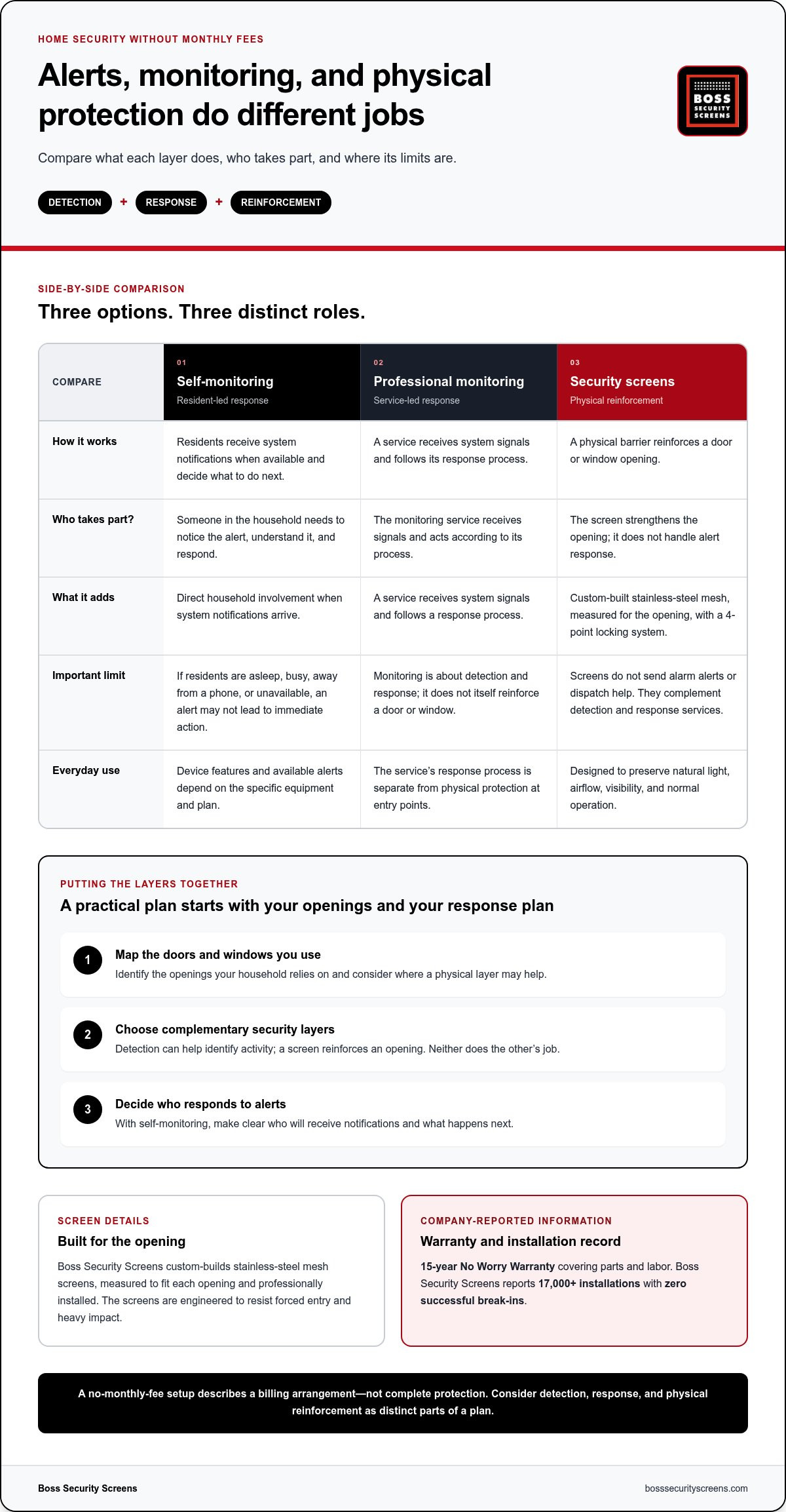
These options solve different parts of the security problem. Self-monitoring puts alerts in residents’ hands. Professional monitoring adds an outside service to receive system signals. Security screens reinforce doors or windows. The best fit depends on how much oversight your household wants and which openings you want to strengthen. Compare their roles and limitations rather than treating any one layer as a complete solution.
| Option | Primary function | Resident involvement | Ongoing service dependency | Main limitation |
|---|---|---|---|---|
| Self-monitoring | Notifies residents of activity, depending on the equipment and plan. | Residents need to notice alerts and decide how to respond. | Doesn’t rely on professional monitoring, though some device features may depend on a plan. | An alert can go unnoticed or unanswered. |
| Professional monitoring | A monitoring service receives signals from a security system and follows its response process. | Residents may still need to use the system and follow any instructions they receive. | Depends on an active monitoring arrangement. | It doesn’t physically reinforce doors or windows. |
| Security screens | Add a physical layer at selected doors or windows. | Residents use the opening as part of everyday household routines. | The screen itself doesn’t depend on a monitoring service. | It doesn’t detect activity, send alarm alerts, or dispatch help. |
When might self-monitoring fit a household?
Self-monitoring may suit people who are comfortable managing alerts themselves. Consider your daily availability: are you likely to notice a notification while at work, asleep, or away from your phone? Decide who else in the household can respond and what steps they should take if an alert arrives. The goal is a realistic response plan, not an assumption that someone will always be available.
When does a physical security layer make sense?
A physical layer may be worth considering if your priority is reinforcing a frequently used door, first-floor window, or patio slider. Screens address the opening itself; alarms or cameras may detect activity there. Boss Security Screens custom-builds and professionally installs stainless-steel mesh screens measured for each opening. For a closer look at options for windows, explore security window screens.
Households don’t have to choose only one approach. Someone who wants alerts and hands-on oversight might pair self-monitoring with a physical barrier at a vulnerable opening. A household seeking outside oversight might use professional monitoring while also strengthening entry points. In both cases, identify what each layer handles and where the household still needs a plan.
For a broader perspective, compare these roles with other parts of your home’s security setup, such as lighting, locks, and household routines. That wider view makes it easier to decide which combination fits your priorities. The right plan is one with clear responsibilities: detection identifies activity, monitoring supports a response, and physical screens reinforce openings.
How Can You Plan Home Security Without Monthly Fees?
A useful plan starts with your home’s actual layout and your household’s routines. The goal isn’t to collect devices. It’s to decide which openings need attention, what each security layer should do, and who will respond if the system sends an alert. Use this process to build home security without monthly fees around practical needs, not assumptions.
- Map the openings. Walk through the home and note each accessible door, window, and patio slider. Mark which ones are used often, open onto less-visible areas, or already have a security measure in place.
- Choose layers for specific needs. Consider detection devices where you want alerts, lighting where visibility matters, and physical reinforcement at openings you want to strengthen. Each layer has a different job.
- Set response roles. For self-monitored equipment, decide who will receive notifications and what that person should do. Make the plan clear to everyone in the household.
- Review everyday use. Check that the setup supports ordinary opening and closing, clear visibility, airflow, household accessibility, and emergency egress where relevant.
Which entry points should you assess first?
Start with doors and windows that are accessible and part of daily routines. Think about the main entrance, a back or side door, ground-level windows, and patio sliders. Ask which openings people use most, which are routinely left open for airflow, and which already have a strong lock or another security measure. Prioritize based on your answers, then consider security doors for an entry you want to reinforce.
How do you keep the setup practical for everyday life?
Protection should fit the household, not disrupt it. Consider whether each door or window can be opened and closed normally, whether the view and airflow remain suitable, and whether everyone can use the setup comfortably. Operable Boss Security Screens window systems use ADA-compliant egress latches. Include emergency exit access in your planning and make sure household members know how their openings operate.
Boss Security Screens custom-builds each system around the specific opening and professionally installs it, with screens designed to preserve normal operation. This measured approach matches the physical layer to the doors and windows you identified instead of treating every opening as identical.
Finally, make the response plan easy to remember. If one person usually manages alerts, identify a backup for times they’re unavailable. Ensure household members know which notifications they’re responsible for and how to respond. A simple, understood plan is more practical than a complicated setup nobody feels ready to manage.
If you’ve identified doors or windows you’d like to reinforce, request a free consultation and free estimate. Call 1-800-203-5644 or (702) 637-0255, email info@bosssecurityscreens.com, or visit bosssecurityscreens.com.
How Can Boss Security Screens Add Physical Protection Without a Monitoring Plan?
Home security without monthly fees can include a physical layer, not just equipment that detects activity. Boss Security Screens custom-builds and professionally installs stainless-steel mesh screens for doors and windows. They reinforce selected openings and work alongside alarms, cameras, or monitoring services. They don’t send alerts or dispatch help, so understand them as part of a household security plan, not a replacement for detection or response.
What should homeowners expect from custom security screens?
Each screen is measured and built around the specific opening, then professionally installed. That tailored fit matters because doors and windows differ in size and use. The stainless-steel mesh is designed to preserve natural light, airflow, visibility, and normal operation, adding a sturdy physical layer while keeping everyday use in mind.
Every screen includes a 4-point locking system. Boss Security Screens reports 17,000+ installations with zero successful break-ins. The company also provides a 15-year No Worry Warranty covering parts and labor, and is Licensed, Bonded & Insured, holds an A+ BBB Rating, and is 110% Made in USA. These details describe the screen option and the business behind it, but they don’t change the screen’s role. It reinforces an opening, while monitoring systems handle detection and response.
What is the next step for a tailored security plan?
Start with the openings you identified as priorities. A frequently used front door, a window you open for airflow, or a patio slider may each call for a different solution. During a free consultation, homeowners can discuss which doors, windows, or patio sliders they want to reinforce and how those openings fit into daily routines. The goal is to match the screen to the opening, with visibility and normal operation in mind.
For a practical security plan, keep the roles clear: screens provide a physical layer, while alarms, cameras, and monitoring services may support detection or response. Combining layers can address different needs without expecting one measure to do everything. A free estimate offers a next step for considering custom-built screens for the openings that matter most to your household.
Schedule a free consultation and estimate. Call 1-800-203-5644 or (702) 637-0255, email info@bosssecurityscreens.com, or visit bosssecurityscreens.com.
Choose the Next Step Toward a More Secure Home
Start with one practical priority: an opening or daily routine you’d like to feel more confident about. Write down what matters for that part of your home, whether it’s ease of use, visibility, or a stronger sense of security. A focused starting point can make planning feel manageable.
Use those priorities to start a tailored conversation about your home. You don’t need to solve every detail at once. A clear first step can help you move forward with confidence.
Frequently Asked Questions
Can I have home security without monthly fees?
Yes. Start by checking what your equipment can do without an ongoing plan, since features can differ between systems. Write down which functions are available, which require a subscription, and what you’d lose if an optional plan ends. This review helps you choose based on your household’s needs rather than assuming every device works the same way without recurring service.
Is self-monitored home security enough?
That depends on whether your household can consistently manage its responsibilities. Before choosing self-monitoring, decide who will check notifications, how a backup person can take over, and what steps everyone should follow if something seems wrong. Consider times when you may be unavailable, such as during work or travel. A response plan that fits real routines can help you judge whether this level of oversight feels right.
Do security screens require a monthly monitoring fee?
No. Security screens are a physical home improvement rather than a monitoring subscription. To assess whether they suit your home, list the doors, windows, or patio sliders you want to strengthen and note how each is used. That gives you a practical basis for deciding where a screen could fit into your household’s priorities, without confusing a physical product with an ongoing alert or response service.
Can security screens replace an alarm system?
No. They aren’t interchangeable. If you’re deciding what your home needs, consider what you want to happen in different situations: noticing an event, receiving a notification, or reinforcing a particular opening. Then identify which needs your current setup addresses and where you’d like additional support. This helps you compare options by their purpose instead of expecting one measure to perform every security function.
Will security screens make my home dark or block airflow?
No. Boss Security Screens’ stainless-steel mesh preserves natural light, airflow, and visibility. If you’re considering a screen for a room you use often, think about the view and ventilation you want to maintain there. The design balances a physical security layer with these everyday qualities, so you can consider protection without treating comfort and an open view as automatic trade-offs.
Can I still open doors and windows normally with security screens installed?
Yes. Boss Security Screens measures each system around its opening and designs it to maintain normal operation. As you plan, note which household members use each door or window and how often it needs to open. That context keeps everyday access in focus. Operable window screens use ADA-compliant egress latches, an important feature for households considering how an opening functions during an emergency.
What warranty comes with Boss Security Screens?
Boss Security Screens includes a 15-year No Worry Warranty covering parts and labor. Keep the warranty information with your installation records so it’s easy to refer to later. For a free consultation and estimate on custom-built security screens, contact Boss Security Screens. Call 1-800-203-5644 or (702) 637-0255, email info@bosssecurityscreens.com, or visit bosssecurityscreens.com.